> For the complete documentation index, see [llms.txt](https://docs.hidemium.io/llms.txt). Markdown versions of documentation pages are available by appending `.md` to page URLs; this page is available as [Markdown](https://docs.hidemium.io/hidemium-4/ii.-thiet-lap-va-cau-hinh-he-thong/thay-doi-o-cai-dat-app-4.2.5-tro-len.md).
# Thay đổi ổ cài đặt app 4.2.5 trở lên
Hướng dẫn thay đổi ổ cài đặt app hidemium từ 4.2.5 trở lên
#### Lưu ý:
* Chỉ hỗ trợ trên hệ điều hành Windows.
* Cho phép lựa chọn ngôn ngữ sau khi cài đặt ứng dụng.
* Hỗ trợ di chuyển đường dẫn lưu dữ liệu cũ của ứng dụng Hidemium sang vị trí mới.
* Nếu đã cài app trước đó và muốn chuyển ổ lưu data sang ổ khác thì phải tiến hành thêm từ bước này: Đường dẫn lưu data cũ (C:\Users\hachitech solution\\.hidemium\_4), chuyển toàn bộ data trong folder này sang folder mới (Ví dụ: D:\hidemium\_4) trước khi cài app và chọn folder này ở bước 4 là folder ở ổ mới thì phải tiến hành chuyển toàn bộ data sang folder mới.
* Tên folder khi đặt không được sử dụng tiếng việt có dấu và khoảng trắng
#### **Note:**
* Only supported on the Windows operating system.
* Allows selecting the application language after installation.
* Supports relocating the old Hidemium data storage directory to a new location.
* If the app was previously installed and you want to move the data storage to another drive, perform the following before installation: Move all data from the old data directory: (C:\Users\hachitech solution\\.hidemium\_4) to a new folder (e.g:D:\hidemium\_4) **before installing the app**, and select this new folder in **Step 4**.
* Folder names must **not** contain Vietnamese accents or whitespace.
**Đối với những user đã từng cài app, nếu có ý muốn chuyển ổ lưu dữ liệu thì trước khi cài cần làm theo bước này:**
**For users who have previously installed the app, if they want to change the data storage drive, they need to follow this step before installing:**
Chuyển tất cả các dữ liệu trong folder này : C:\Users\\(ten\_may}\\.hidemium\_4 sang folder mới mà bạn định chuyển qua.
**Move all data in this folder: C:\Users\\(computer\_name)\\.hidemium\_4 to the new folder that you plan to switch to.**
 Sau khi chuyển xong thì tiến hành cài đặt app theo các bước bên dưới.
After completing the transfer, proceed to install the app following the steps below.
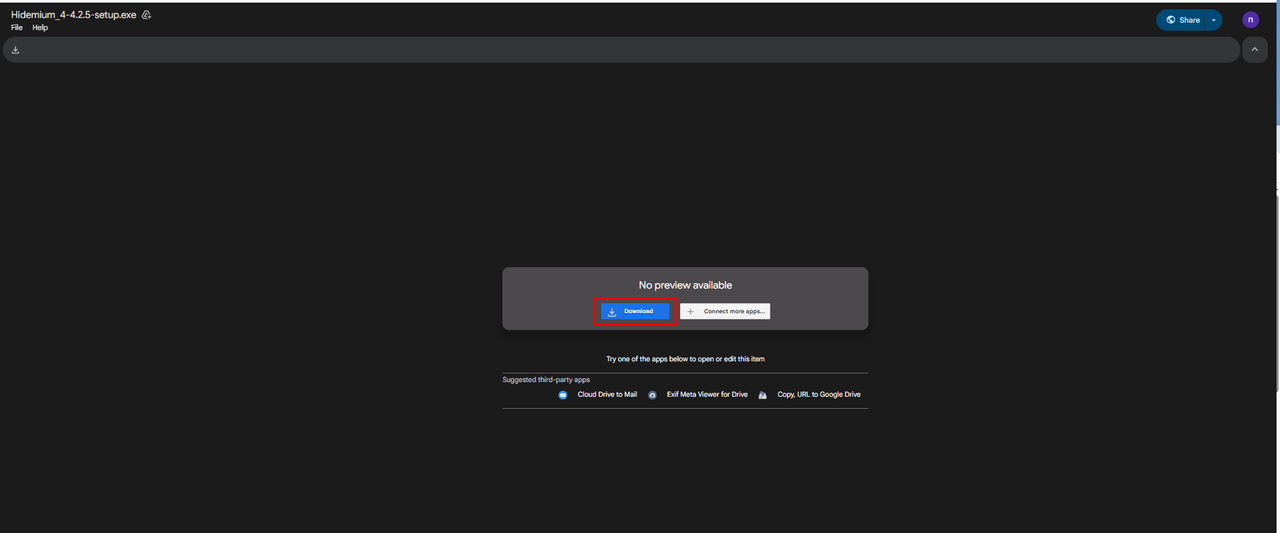
**Bước 1: Tải bản cài về máy**
**Step 1: Download the installer to your computer.**
Sau khi chuyển xong thì tiến hành cài đặt app theo các bước bên dưới.
After completing the transfer, proceed to install the app following the steps below.
**Bước 1: Tải bản cài về máy**
**Step 1: Download the installer to your computer.**
 **Bước 2: Tiến hành cài đặt mở file cài**
**Step 2: Run the installer file to begin installation.**

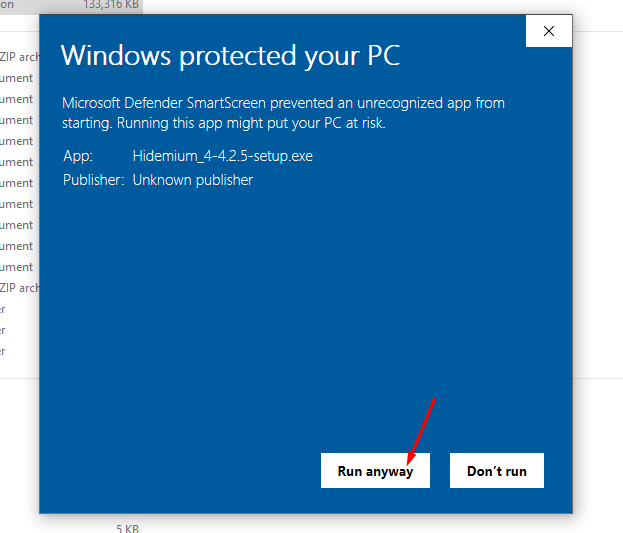
**Bước 3: Chọn "Run anyway"**
**Step 3: Select “Run anyway”.**
\
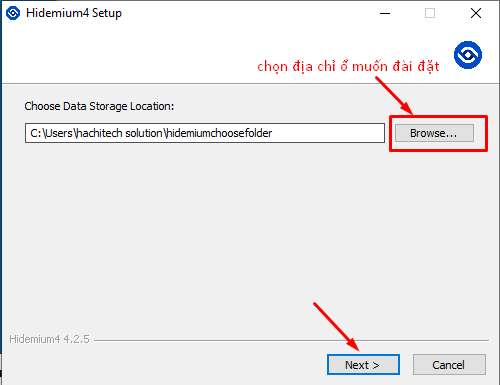
**Bước 4: chọn địa chỉ muốn đặt thư mục sau đó ấn "Next" để tiếp tục nếu cài mới app**
**Step 4: Choose the directory where you want to install the application, then click “Next” to continue (for new installations).**
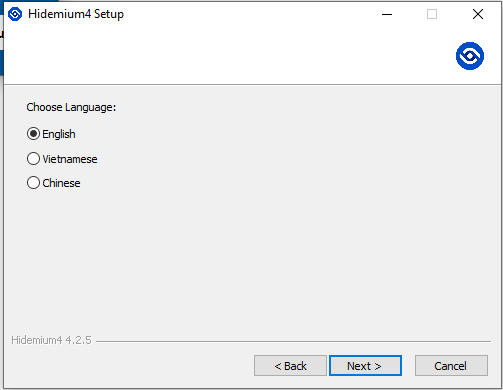
**Bước 5: Chọn ngôn ngữ app Hidemium khi mở app, tiếp theo chọn install để hoàn thành setup**
**Step 5: When launching Hidemium for the first time, select the application language, then click “Install” to complete the setup.**
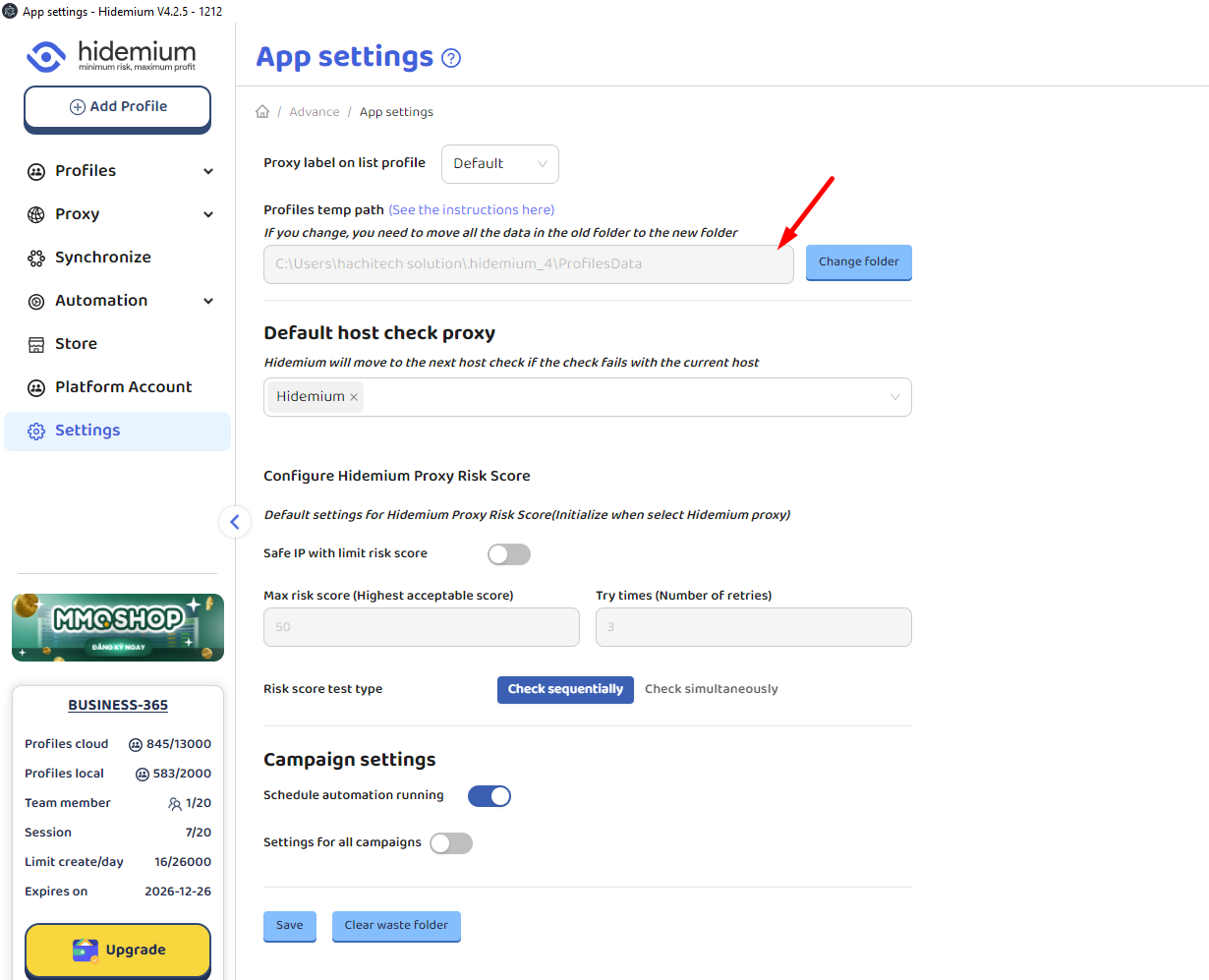
**Bước 6: Kiếm tra lại đường dẫn trong app setting đúng là đường dẫn của folder ở ổ mới chưa (đối với trường hợp user vẫn lưu data profile trong folder mặc định của hidemium thì cần đổi lại đường dẫn folder mới)**
**Step 6: Verify in the app settings that the data storage path has been correctly updated to the new folder. For users still storing profile data in Hidemium’s default folder, update the storage path to the new folder.**
**Bước 2: Tiến hành cài đặt mở file cài**
**Step 2: Run the installer file to begin installation.**

**Bước 3: Chọn "Run anyway"**
**Step 3: Select “Run anyway”.**
\

**Bước 4: chọn địa chỉ muốn đặt thư mục sau đó ấn "Next" để tiếp tục nếu cài mới app**
**Step 4: Choose the directory where you want to install the application, then click “Next” to continue (for new installations).**

**Bước 5: Chọn ngôn ngữ app Hidemium khi mở app, tiếp theo chọn install để hoàn thành setup**
**Step 5: When launching Hidemium for the first time, select the application language, then click “Install” to complete the setup.**

**Bước 6: Kiếm tra lại đường dẫn trong app setting đúng là đường dẫn của folder ở ổ mới chưa (đối với trường hợp user vẫn lưu data profile trong folder mặc định của hidemium thì cần đổi lại đường dẫn folder mới)**
**Step 6: Verify in the app settings that the data storage path has been correctly updated to the new folder. For users still storing profile data in Hidemium’s default folder, update the storage path to the new folder.**
