# 评估 (Eval)

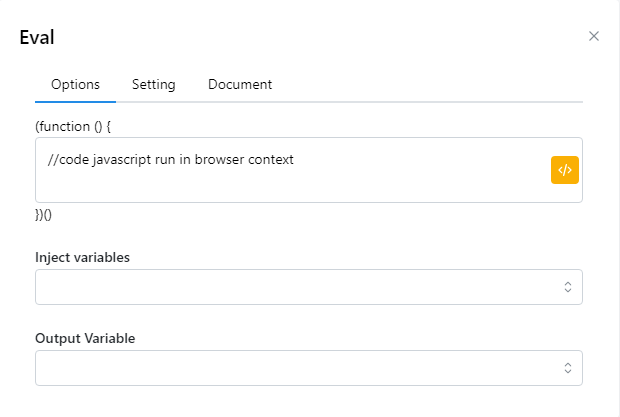
节点执行字符串中描述的 JavaScript 命令。
<figure><img src="/files/osPVwW0KgFXCCCyg5aeq" alt=""><figcaption></figcaption></figure>

<table><thead><tr><th width="258">参数</th><th>说明</th></tr></thead><tbody><tr><td>JavaScript</td><td>输入 JavaScript 代码</td></tr><tr><td>Inject variavles</td><td>选择要插入的变量，该变量可以在js函数中使用</td></tr><tr><td>Output variable</td><td>将 Javascript 脚本函数返回的值存储在变量中。</td></tr></tbody></table>

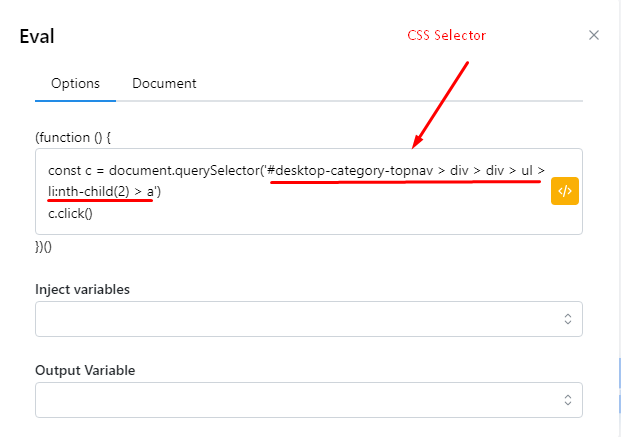
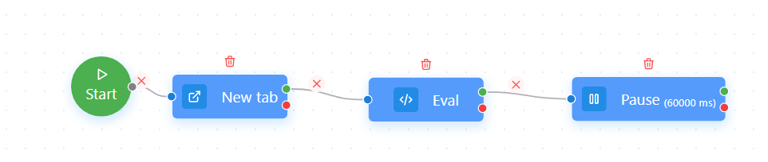
我们有以下示例：当您访问网站时，您想要单击某个元素，除了使用单击按钮之外，您还可以使用 Eval 节点来执行该单击操作。我们有一个简单的脚本如下：

<figure><img src="/files/KEVsQy1pawKQ4kSzULB1" alt=""><figcaption></figcaption></figure>

在 Eval 节点中，输入以下内容以便能够单击所需的元素：

<figure><img src="/files/qPtr7xt6uuqe5NTwsujE" alt=""><figcaption></figcaption></figure>

这样您也可以单击所需的元素，而无需使用单击按钮。

{% file src="/files/lm6HdliLB985jsshyIlD" %}


---

# Agent Instructions: Querying This Documentation

If you need additional information that is not directly available in this page, you can query the documentation dynamically by asking a question.

Perform an HTTP GET request on the current page URL with the `ask` query parameter:

```
GET https://docs.hidemium.io/zi-dong-hua-yong-hu-shou-ce/qi-ta-other/ping-gu-eval.md?ask=<question>
```

The question should be specific, self-contained, and written in natural language.
The response will contain a direct answer to the question and relevant excerpts and sources from the documentation.

Use this mechanism when the answer is not explicitly present in the current page, you need clarification or additional context, or you want to retrieve related documentation sections.