> For the complete documentation index, see [llms.txt](https://docs.hidemium.io/llms.txt). Markdown versions of documentation pages are available by appending `.md` to page URLs; this page is available as [Markdown](https://docs.hidemium.io/zi-dong-hua-yong-hu-shou-ce/shu-biao/dan-ji-click.md).

# 单击 (Click)

<figure><img src="/files/Aqall6C1zMIL7JVoiLx8" alt=""><figcaption></figcaption></figure>

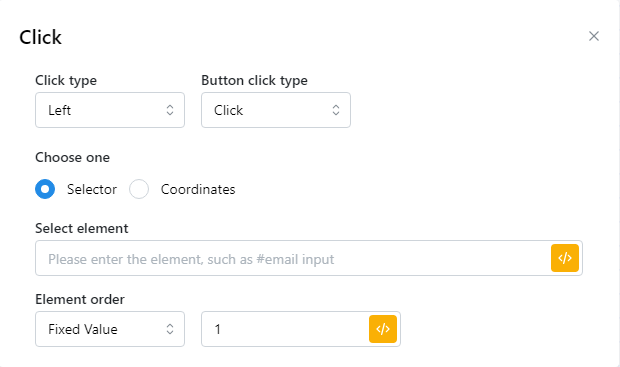
<table><thead><tr><th width="258">参数</th><th>说明</th></tr></thead><tbody><tr><td>Click type</td><td><p>左键：在所选元素上单击鼠标左键 </p><p>右键：在所选元素上单击鼠标右键 </p><p>中建：在所选元素上单击鼠标并在新标签页中打开。 </p><p>向下单击：单击鼠标并同时按住鼠标按钮。 </p><p>向上单击：在所选元素上释放鼠标按钮。</p></td></tr><tr><td>Button click type</td><td><p>单击：在所选元素上单击一次 </p><p>双击：在所选元素上双击鼠标</p></td></tr><tr><td>Selector</td><td>输入要点击的元素的 CSS 选择器。</td></tr><tr><td>Element order </td><td>"选择网站的哪个元素： 固定值：选择一个固定元素 随机值：在设定的范围内随机选择一个随机值"</td></tr><tr><td>Coordinates</td><td>输入要点击的元素的 x,y 坐标</td></tr></tbody></table>


---

# Agent Instructions
This documentation is published with GitBook. GitBook is the documentation platform designed so that both humans and AI agents can read, navigate, and reason over technical content effectively. Learn more at gitbook.com.

## Querying This Documentation
If you need additional information that is not directly available in this page, you can query the documentation dynamically by asking a question.

Perform an HTTP GET request on the current page URL with the `ask` query parameter, and the optional `goal` query parameter:

```
GET https://docs.hidemium.io/zi-dong-hua-yong-hu-shou-ce/shu-biao/dan-ji-click.md?ask=<question>&goal=<endgoal>
```

`ask` is the immediate question: it should be specific, self-contained, and written in natural language.
`goal` is optional and describes the broader end goal you are ultimately trying to accomplish on behalf of the user. GitBook uses it to tailor the answer towards what is most useful for that goal.

The response will contain a direct answer to the question and relevant excerpts and sources from the documentation.

Use this mechanism when the answer is not explicitly present in the current page, you need clarification or additional context, or you want to retrieve related documentation sections.
