> For the complete documentation index, see [llms.txt](https://docs.hidemium.io/llms.txt). Markdown versions of documentation pages are available by appending `.md` to page URLs; this page is available as [Markdown](https://docs.hidemium.io/zi-dong-hua-yong-hu-shou-ce/tiao-xiang-qi/guan-bi-biao-qian-ye-close-tab.md).
# 关闭标签页 (Close tab)
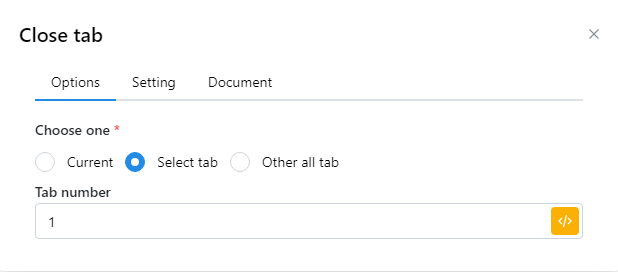
您可以选择关闭当前标签页或选择一个标签页,如果选择标签页,则需要输入标签页编号。
 | 参数 | 说明 |
| ------------- | ---------------------------------- |
| Curent | 关闭正在活动的标签页 |
| Select tab | 选择要关闭的标签页。输入要关闭的标签页号或选择包含标签页编号的变量。 |
| Other all tab | 关闭除活动选项卡之外的所有选项卡。 |
例如,有以下 3 种标签页:
| 参数 | 说明 |
| ------------- | ---------------------------------- |
| Curent | 关闭正在活动的标签页 |
| Select tab | 选择要关闭的标签页。输入要关闭的标签页号或选择包含标签页编号的变量。 |
| Other all tab | 关闭除活动选项卡之外的所有选项卡。 |
例如,有以下 3 种标签页:
 当您选择当前时,Ebay 标签页将关闭。如果您选择选择标签页并输入数字 2,Youtube 标签页将关闭。标签编号从 1 开始。 如果您选择所有其他标签页,Facebook 和 Youtube 将关闭。