# 截图 (Screenshot)

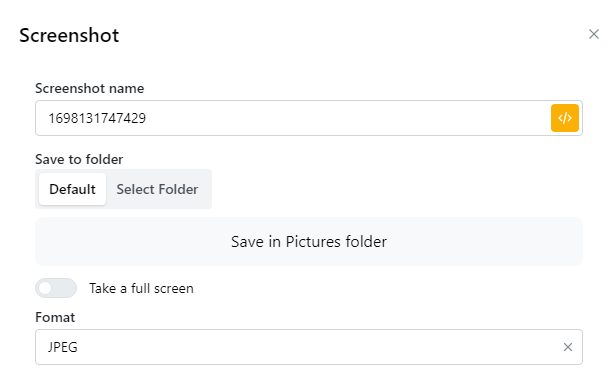
<figure><img src="/files/w5hmthcYxIYJHyH86ajQ" alt=""><figcaption></figcaption></figure>

<table><thead><tr><th width="239">参数</th><th>说明</th></tr></thead><tbody><tr><td>Screenshot name</td><td>您可以输入您想要的图片名称或者使用node的默认名称。</td></tr><tr><td>Save to folder: Default</td><td>自动将照片保存到设备的图片文件夹。</td></tr><tr><td>Save to folder: Select Folder</td><td>选择保存照片的地方。</td></tr><tr><td>Take a full screen</td><td><p>开启：截取整个网页</p><p>关闭：截取网站屏幕上当前显示的部分</p></td></tr><tr><td>Format</td><td>选择导出图像格式为 png 或 jpeg。</td></tr></tbody></table>


---

# Agent Instructions: Querying This Documentation

If you need additional information that is not directly available in this page, you can query the documentation dynamically by asking a question.

Perform an HTTP GET request on the current page URL with the `ask` query parameter:

```
GET https://docs.hidemium.io/zi-dong-hua-yong-hu-shou-ce/tiao-xiang-qi/jie-tu-screenshot.md?ask=<question>
```

The question should be specific, self-contained, and written in natural language.
The response will contain a direct answer to the question and relevant excerpts and sources from the documentation.

Use this mechanism when the answer is not explicitly present in the current page, you need clarification or additional context, or you want to retrieve related documentation sections.