> For the complete documentation index, see [llms.txt](https://docs.hidemium.io/llms.txt). Markdown versions of documentation pages are available by appending `.md` to page URLs; this page is available as [Markdown](https://docs.hidemium.io/automation-user-manual/data/delete-file.md).
# Delete file
When you want to delete a file or a folder in your computer, you can use this node. The files or folders will be completely deleted from your computer.
Khi bạn muốn xóa 1 file hoặc một thư mục nào đó trong máy tính của bạn, bạn có thể sử dụng node này. Các file hoặc folder sẽ bị xóa hẳn khỏi máy tính của bạn.
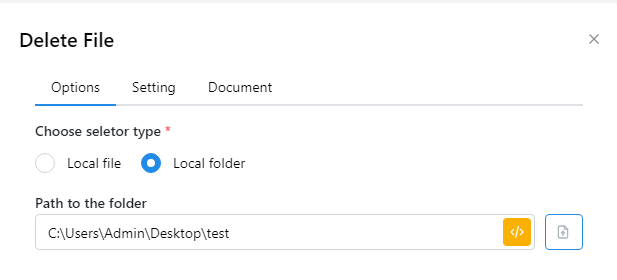
* Local file: Enter the path to the file you want to delete or select a variable containing a valid path.
* Local folder: Enter the path of the folder you want to delete or select a variable containing a valid path.
* Local file: Nhập path tới file mà bạn muốn xóa hoặc chọn biến chứa path hợp lệ.
* Local folder: Nhập path của folder muốn xóa hoặc chọn biến chứa path hợp lệ.
For example, if you want to delete the test folder, enter the following. After you run, the test folder will be deleted from your computer:
Ví dụ bạn muốn xóa folder test thì bạn nhập như sau, sau khi bạn chạy thì folder test sẽ bị xóa khỏi máy của bạn: