> For the complete documentation index, see [llms.txt](https://docs.hidemium.io/llms.txt). Markdown versions of documentation pages are available by appending `.md` to page URLs; this page is available as [Markdown](https://docs.hidemium.io/automation-user-manual/data/get-text.md).
# Get text
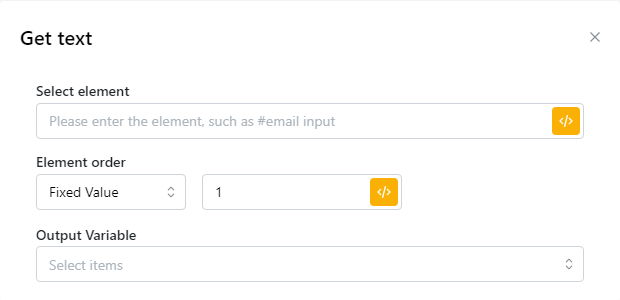
You need to select an element and then the script will get the text value contained in that element and save to the variable of your choice.\
\
Bạn cần chọn một phần tử và sau đó script sẽ lấy giá trị văn bản có trong phần tử đó và lưu vào biến bạn chọn.
| parameter | illustrate |
| --------------- | -------------------------------------------------------------------------------------------------------------------------------------------------------- |
| Select element |
Enter the CSS selector of the element containing the text you want to get
Nhập CSS selector của phần tử chứa text mà bạn muốn lấy
|
| Element order |
Select elements based on the order they appear on the page
Chọn các thành phần dựa trên thứ tự chúng xuất hiện trên trang
|
| Output variable |
Save the extracted elements as variables and enter the variable name
Lưu các phần tử được trích xuất dưới dạng biến và nhập tên biến