> For the complete documentation index, see [llms.txt](https://docs.hidemium.io/llms.txt). Markdown versions of documentation pages are available by appending `.md` to page URLs; this page is available as [Markdown](https://docs.hidemium.io/automation-user-manual/other/run-command.md).
# Run command
* Command line: Nhập tên file hoặc đường dẫn đầy đủ của file cần thao tác. Ví dụ bạn có thể nhập như sau: D:\test\3.mp4 hoặc nhập 3.mp4
* Dir: Ghi đường dẫn chứa file. Nếu trường **Command line** bạn đã nhập đầy đủ đường dần của file như thế này: D:\test\3.mp4 thì tại trường **Dir** bạn nên bỏ trống. Còn nếu trường **Command line** bạn nhập 3.mp4 thì ở trường **Dir** bạn cần nhập D:\test
* Time Skip: là thời gian chờ output của process chạy từ command, nếu process không return output thì sẽ next sang node khác sau thời gian timeout với status = success, nếu timeout = 0 và process không return thì sẽ không next sang node khác. Nói dễ hiểu hơn thì khi chạy node run command để mở một vài file, file đã được mở lên thành công nhưng không thể chạy node tiếp theo. khi đó bạn cần nhập Time skip để sau thời gian bạn nhập thì node tiếp theo sẽ được chạy. Ví dụ nếu bạn cần mở file txt, excel,... thì bạn cần nhập Time skip.
* Output Variable: kết quả khi chạy node này sẽ được lưu tại đây, bạn cần chọn biến để lưu.
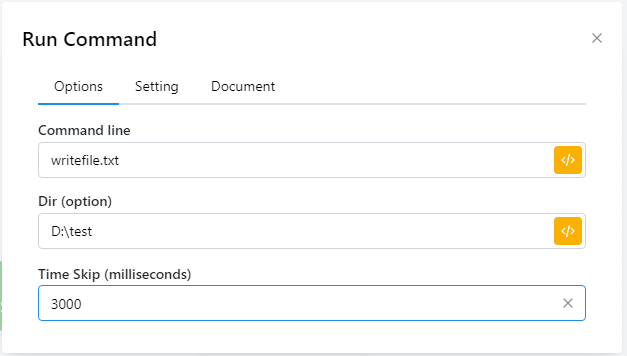
Ví dụ với trường hợp mở file txt, bạn cần nhập như sau:
Như vậy là khi mở file thành công thì sau 3 giây thì node tiếp theo sẽ được chạy.